
v3.0
Never let the soul of animation give in to the whims of modernity.
Tired of animation programs being a pain to work with? Tired of AI features, telemetry, commercial spyware and subscription models? Orion MX is an easy, lightweight, oldschool 2D & 3D animation studio for short films, web animation, motion comics and storyboards. Or whatever you want, really.
No subscriptions, no AI, no nonsense · lifetime updates · source on request.
What is it? a quick tour
TVA Orion MX is a desktop animation suite that fits in one window. You get a real timeline, layers, a node-based effects graph, a 3D pipeline, and all the drawing tools you'd expect, without having to learn a 2-hour onboarding flow or register an account or wait for a cloud render.
It is meant for short films, web animation, motion comics and storyboards. It is extensively tested, but if you find a bug, write to me. I'll patch it personally and send you a new version for free ASAP.
Draw & Object Editing
Supports both bitmap and vectorial animation
Layer Management
Add, remove, duplicate, reorder. Visibility, lock, opacity. Per-layer state preserved across saves.
Node-based Effects
Drag-and-drop EffectGraphPanel: create nodes, drag-link ports, tweak per-node controls, rebuild the graph live.
3D Pipeline Hooks
Open the FD3D editor/engine, import 3D scenes & render sequences, sync playback and frames automatically.
Camera
Add & remove a camera for the 2D canvas.
Import / Export Anything
Image, layered image, vector, audio, 3D scene, render sequences, camera tracks. Out: animation, image sequence, single frame.
A peek inside the whole UI fits in one window
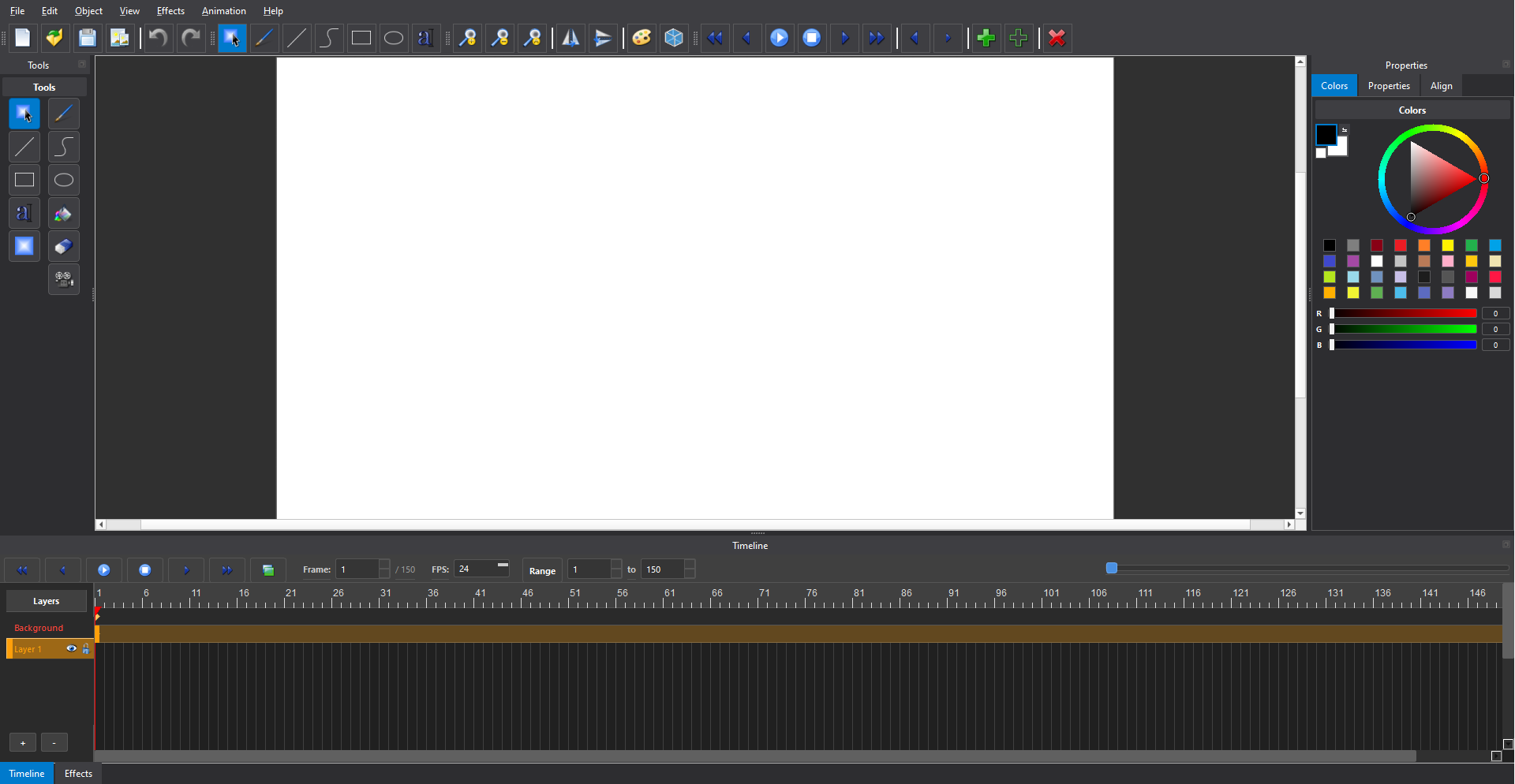
Features everything that's in the box
Core Drawing & Object Editing
- Authoring tools: select, draw, line, curve, rectangle, ellipse, text, bucket fill, gradient fill, eraser, skeleton.
- Quick controls: stroke width, color, selection mode switching, camera-add right from the tools panel.
- Object editing: align & distribute, arrange (z-order), transforms (flip, rotate).
Layer Management
- Add, remove, duplicate, reorder layers.
- Per-layer visibility, lock, opacity, selection.
- Layer state preserved across save/load.
Import / Export & Project Operations
- File menu: new, open, save, save-as, autosave settings, canvas size.
- Import: image, layered image, vector, audio, 3D scene reference, 3D render sequence, camera track.
- Export: animation, image sequence, single frame, SVG.
- Built-in windows: raster editor, final-render window.
Effects Graph (Node-based)
- Dedicated Effect Graph Panel with drag-and-drop node creation.
- Link-dragging between ports, per-node controls, graph refresh / rebuild.
- Effects menu in the main window with direct evaluator access.
3D Pipeline Integration
- Slots and actions to open the FD3D editor and the FD3D engine.
- Import 3D scenes and render sequences directly into your timeline.
- Playback & frame updates stay in sync with FD3D automatically.
Cameras, Rigging & Deformation
- Camera add / remove actions live under the Object menu.
- Skeleton tool for character rigs and deformation (beta)
Plugin System & Bundled Tools
- Plugin system for effects.
- Ships with FFmpeg and ImageMagick
Download & Buy
Already have Orion MX installed? If your 15-day evaluation period is running out (or already has), you can buy a full license right here.
Your personal license key will be emailed to you within a few minutes of payment. Drop it into the activation screen at startup alongside your email. Make sure you are connected to the internet during the activation process.
After payment you'll get a personal license key by email. Payments are handled by PayPal. Keep the email; that's your receipt and your key.
System requirements
Minimum technical baseline
| OS | Windows 10+ (Linux & macOS distros in the works) |
|---|---|
| GPU / API | OpenGL 3.3 Core compatible |
| Screen / project | 1366 × 768 |
Recommended
| Display | 1920 × 1080 or higher for comfortable editing -- 1080p is a first-class preset |
|---|---|
| GPU | A card that handles OpenGL 3.3 reliably across drivers & ANGLE paths |
What's in the box
- Orion MX 3.0 (the app itself)
- FD3D editor & engine
- Bundled FFmpeg & ImageMagick
- Various plugins for effects
Contact
Found a bug? Got a feature request? Want the source? Just say hi? Drop me a note and I'll get back to you ASAP ^__^
If you found a bug: tell me what you were doing, what you expected, and what happened instead. If it's reproducible, I'll patch it and send you a new build for free as soon as I can. Also, if possible, you can contact me thru Discord and send me a screenshot or recording of the problem in action. That would help a lot actually